Configurable PDF Layouts
Generate PDF documents with graphs, tables, or both. Choose portrait or landscape orientation, and select colour, monochrome (black and white), or high-contrast styling using heavier fonts and rule weights for legibility.
 PulsePrécis
 reads the Apple Health categories you choose and generates clean PDF reports, CSV spreadsheets, and JSON datasets directly on your iPhone or iPad.
Actual PulsePrécis app screens captured using fictional demo data, not live personal health records. Tap a screen to enlarge.
Select date ranges and individual health categories. PulsePrécis prepares structured summaries on your device without altering your underlying Apple Health records.
Generate PDF documents with graphs, tables, or both. Choose portrait or landscape orientation, and select colour, monochrome (black and white), or high-contrast styling using heavier fonts and rule weights for legibility.
Export daily summaries or optional detailed source records as standard CSV spreadsheets or structured JSON files for personal archives, spreadsheet review, or sharing through the standard iOS share sheet.
Place iOS Home Screen widgets for supported Apple Health metrics. Widget update timing and refresh frequency are controlled by iOS rather than guaranteed by the app.
Include heart rate ranges and daily averages, resting and walking heart rate, HRV, blood pressure, blood glucose, blood oxygen, activity and steps, weight, and sleep where records are available. Missing metrics are omitted from PDF reports with an explanation, and report preparation fails if nothing reportable is available for the selected metrics and dates. Weight only can show the latest prior measurement outside the selected period, explicitly dated as context.
On iOS 26+, with explicit Apple Health medication read permission, you can optionally include recorded Apple Health medications in PDF reports. PulsePrécis has no medication planner and does not import future medication schedules; medication entry, doses, and reminders stay in the Apple Health app.
Record manual heart rate, blood pressure, or blood glucose readings when needed. New entries are written to Apple Health only after you explicitly tap Save.
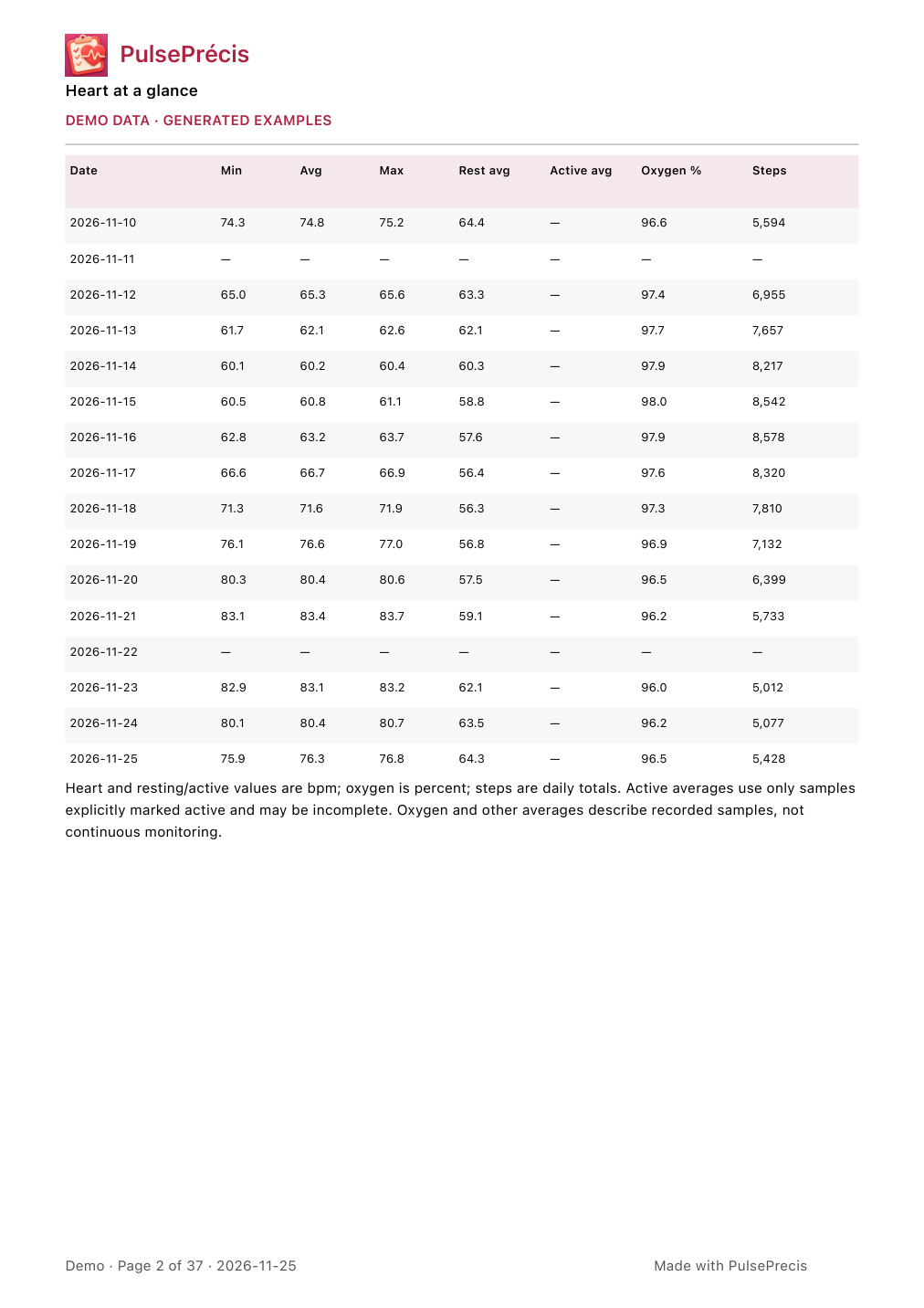
Inspect pages 1 and 2 of an actual 37-page PDF report generated by PulsePrécis using fictional demo data, or open the complete sample PDF directly.
These pages come directly from PulsePrécis output generated with fictional demo data. Each section combines daily summary tables, range charts, methodology notes, and explicit indicators where dates have no recorded samples.
YYYY-MM-DD in the selected report time zone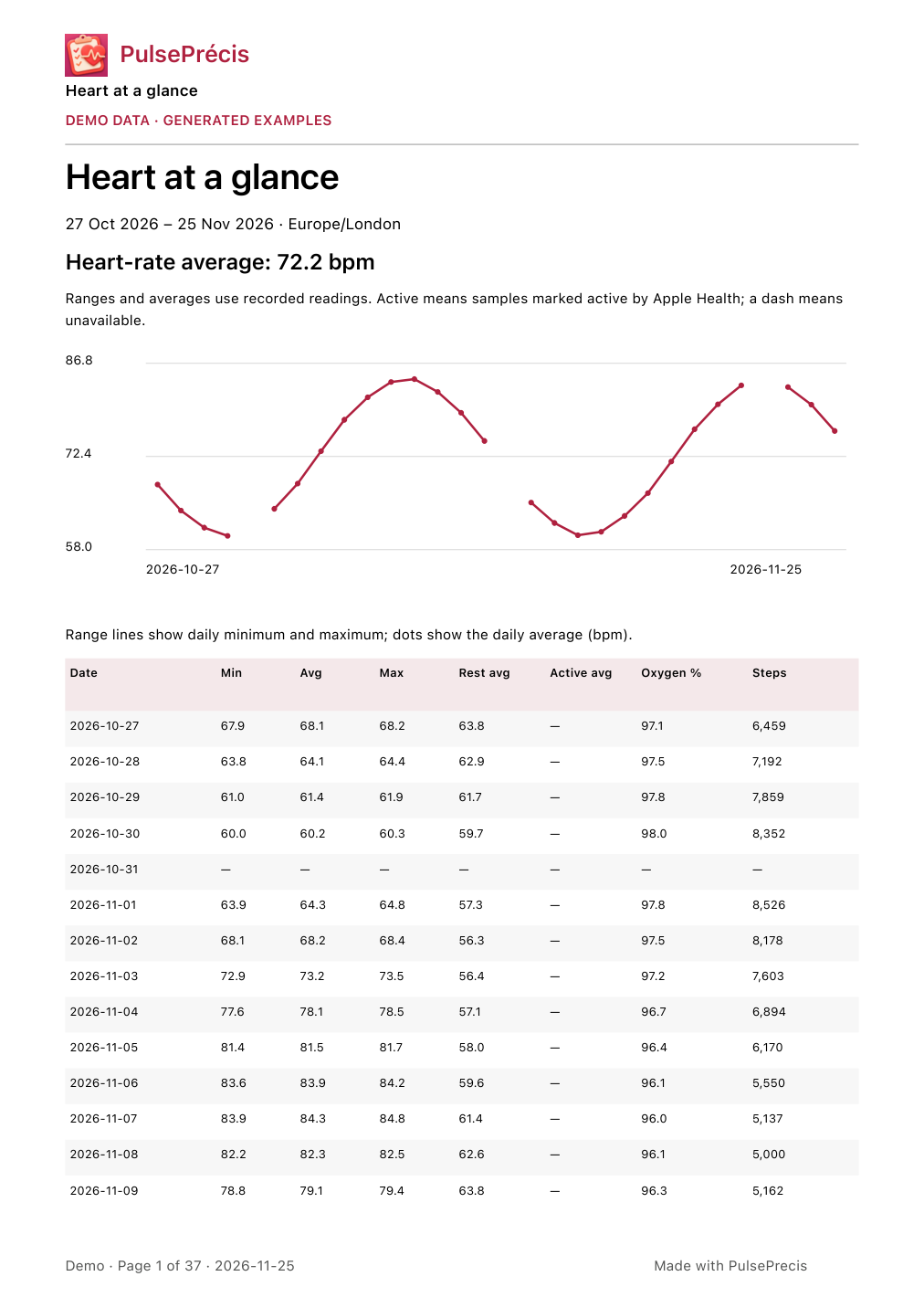
Configure how your PDF report looks before preparation so it suits on-screen review, clinical sharing, or office printing.
You can optionally enter a patient name and date of birth in report options to appear in the PDF header. On iOS 26+ with Apple Health medication permission, you can also include a read-only list of recorded medications.
If a selected metric has no readable records in your chosen period, it is omitted from the PDF with an explanation; if nothing reportable exists across all chosen metrics, report preparation fails. Weight is the sole metric that can display the latest prior reading outside the selected period, explicitly dated as context.
Export tabular spreadsheets or structured JSON datasets for personal record keeping, custom charts, or archival storage.
YYYY-MM-DD, while CSV source-record timestamps carry explicit timezone contextdate fields—are encoded as ISO-8601 timestamps
Formatted with one row per metric/day (using YYYY-MM-DD summary dates)—or one row per source record (with timezone-aware timestamps) when detailed source records are enabled—containing date, metric, value, and unit columns alongside contextual metadata columns.
Structured with top-level schemaVersion, generatedAt, and metrics containing daily summaries and optional source records when enabled. All JSON date fields—including daily date values and source-record timestamps—are encoded as ISO-8601 timestamps, and missing JSON fields may be omitted rather than always populated as null.
PulsePrécis does not use subscriptions. Prepare up to 3 complete exports at no cost, then unlock unlimited exports with a single one-time purchase.
Test PDF reports (colour, monochrome, or high contrast), CSV spreadsheets, and JSON exports with your own Apple Health records.
If report preparation fails because nothing reportable is available, no export is prepared.
A single non-consumable in-app purchase removes the 3-export limit on your Apple Account.
Purchase restoration relies on your Apple Account via StoreKit.
When you first select metrics, iOS asks which Apple Health categories PulsePrécis may read (and optionally write if you choose to log manual readings). All calculations and report preparation happen locally on your iPhone or iPad. You can review or change permissions anytime in the Apple Health app by tapping your profile picture or initials, opening Apps (or Apps and Services, depending on OS version), and selecting PulsePrécis.
Dates without recorded samples stay marked unavailable rather than filled with zeros. Metrics with no readable records in your selected period are omitted from PDF reports with an explanation, and report preparation fails if nothing reportable is available across all selected metrics and dates. Weight only can display the latest prior measurement outside the selected period, explicitly dated as context.
Every successfully prepared PDF, CSV, or JSON export counts toward your 3-export free trial as soon as preparation finishes, even before you choose a destination in the share sheet. Your used count is stored in your device Keychain and may persist if you reinstall the app. After purchasing the one-time unlock (US$1.99 base price; local currency prices controlled and shown by Apple), you can restore it anytime via Restore Purchases in Export or Settings using the same Apple Account.
On iOS 26+, with explicit Apple Health medication read permission, PulsePrécis can read Apple Health medication records for optional inclusion in PDF reports. PulsePrécis has no medication planner and does not import future medication schedules; medication entry, doses, and reminders stay in the Apple Health app. For vital signs, PulsePrécis allows manual entry of heart rate, blood pressure, or blood glucose, writing to Apple Health only after you explicitly tap Save.
No. PulsePrécis formats and exports the Apple Health records you select. It does not interpret results clinically, diagnose conditions, or recommend treatment.
Guidance for setting up Apple Health permissions, generating reports, restoring your one-time purchase, and contacting Triplicate Limited.
For questions or troubleshooting help with PulsePrécis for iPhone and iPad, contact our support team:
PulsePrécis can only read Apple Health categories you explicitly allow. To review permissions, open the Apple Health app, tap your profile picture or initials, select Apps (or Apps and Services, as exact menu labels vary by OS version), tap PulsePrécis, and verify read access for each metric you want to include.
Metrics without readable records in your selected dates are omitted from PDF reports with an explanation, and preparation fails if nothing reportable is available across all selected metrics. Weight only can show the latest prior measurement outside the selected period, explicitly dated as context. Check the Apple Health app to confirm readings exist for your chosen dates.
Your 3 free exports are counted as soon as a PDF, CSV, or JSON file is successfully prepared, even before sharing. If you already purchased the one-time unlock, tap Restore Purchases in Export or Settings while signed in to the same Apple Account.
Choose PDF (graphs, tables, or both; portrait or landscape; colour, monochrome, or high contrast using heavier fonts and rule weights), CSV, or JSON. Once prepared, use the standard iOS share sheet to save to Files, print, or send via your chosen app.
PulsePrécis offers Home Screen widgets for supported Apple Health metrics. iOS controls widget refresh timing based on system scheduling and battery state, so update intervals are managed by iOS rather than guaranteed by the app.
Reading Apple Health medication records requires iOS 26+ and explicit Apple Health medication read permission. PulsePrécis has no medication planner and does not import future medication schedules; medication entry, doses, and reminders stay in the Apple Health app. Manual heart rate, blood pressure, or blood glucose entries write to Apple Health only after you explicitly tap Save.
In PulsePrécis Settings, you can export or restore local app preferences and legacy medication plan or dose log data from older app versions.
Published by Triplicate Limited for PulsePrécis (iOS and iPadOS) and pulseprecis.com.
This policy applies to the PulsePrécis app and the pulseprecis.com website. It does not govern Apple services (such as Apple Health, iCloud, or the App Store) or any third-party apps, email providers, or cloud storage services to which you export files.
For privacy questions, Email us.
PulsePrécis does not require user registration or an account. The app contains no third-party advertising networks, no analytics SDKs, and no tracking tools.
We do not operate a server that collects or stores your Apple Health data, and we never sell or use Health data for advertising.
You choose which Apple Health categories PulsePrécis may read or write through standard iOS Health permissions (including Apple Health medication read permission on iOS 26+ when you opt in), which you can review or revoke anytime in the Apple Health app under your profile > Apps (or Apps and Services).
All Health data queries, statistical calculations, charts, and PDF, CSV, or JSON report preparations take place locally on your device. Health records and calculated chart results are held in device memory while the app is open.
Generated PDF, CSV, and JSON reports may contain sensitive health information as well as any patient name or date of birth that you explicitly choose to enter into a report header. You decide when to generate an export and which destination or recipient receives it via iOS sharing. Recipients and cloud providers apply their own privacy policies.
In Settings, you can optionally include local app backup data in your iCloud device backup, which is managed by Apple under your Apple Account settings. If you manually export a local backup file, that file contains sensitive health-related data and is not password-protected; handle and store it carefully.
The optional one-time unlock is processed exclusively by Apple. We do not receive your payment card numbers or billing address.
When you send a message using Email us, we receive your email address and the contents of your message so we can respond to your support request. Please avoid sending sensitive health records or personal identification unless necessary to resolve your issue.
This website is hosted by Cloudflare. Its hosting and security services process technical request information, such as your IP address, browser information and the pages requested, to deliver and protect the site. We do not add analytics, tracking scripts, cookies or online forms. See Cloudflare’s privacy policy for its data practices.